

Last updated: November 2026
A spreadsheet formula returns a single number, and the range of plausible inputs behind that number disappears. Monte Carlo simulation software restores the range by sampling thousands of input combinations and reporting the full distribution of outcomes. Analysts, risk managers, engineers, and finance and policy teams that choose a tool face a crowded field of Excel add-ins and standalone platforms. The right choice depends on where you build models, how large and dynamic they are, and which sampling methods and distributions you need.
This 2027 update refreshes the feature table, prices, and AI features using public vendor information. It reviews seven Monte Carlo simulation tools, five Excel add-ins, and two standalone platforms, and provides a selection guide, free options, and answers to common questions. Lumina’s Monte Carlo experts, the makers of Analytica, wrote it and applied the same criteria to every tool, as the objectivity section explains.
Methodology
This comparison was created by software experts at Lumina, makers of Analytica. We know that Analytica isn’t the perfect fit for every user and application, so we aim to provide a neutral, expert overview to help you find the best tool to fit your needs. We have tried to make this guide as objective and accurate as possible. If you notice anything that seems biased or outdated, please let us know at so we can correct it.
Seven tools at a glance
No single product is best for every team: Excel users with finance or project risk models should compare @RISK, Analytic Solver, and ModelRisk first, while teams with large, multidimensional, or dynamic models should compare Analytica and GoldSim first. The table below matches each of the seven Monte Carlo simulation tools to its type, best use, and starting price.
| Tool | Type | Best for | Starting price |
|---|---|---|---|
| Analytica | Standalone, desktop and web | Transparent, multidimensional models in policy, energy, and risk | Free; Professional $1,000 per year |
| @RISK | Excel add-in | Finance and project risk teams that standardize on Excel | About $2,225 per year |
| Analytic Solver | Excel add-in and web | Simulation combined with optimization in Excel | $3,000 per year (Simulation) |
| ModelRisk | Excel add-in | Technical analysts who need copulas and time series | Up to €1,550 per year |
| ChanceCalc+ | Excel add-in, Windows and Mac | Sharing simulations that run in native Excel, and SIPmath work | Free education version; no full price listed |
| GoldSim | Standalone | Engineering and environmental systems over time | $2,750 per year (lease) |
| Oracle Crystal Ball | Excel add-in | Existing users; availability to new buyers unconfirmed | Not confirmed |
Third-party directories supply the @RISK figure, and the editions table below lists the published prices behind these entries.
Feature and pricing comparison
The tables below separate modeling capabilities from commercial terms, since the two follow different verification cycles. “Yes” marks a capability that vendor documentation confirms, “No” marks a capability that current public documentation does not confirm, and “Paid tier” marks a capability that needs a higher-priced edition.
Modeling capabilities
The first table lists each tool’s maker, type, and desktop platform, followed by the sampling, distribution, dependence, and optimization capabilities that separate the tools.
| Tool | Maker | Type | Platform | Tornado charts | LHS | Sobol | Importance sampling | Metalog | SIPmath | Dependent inputs | Optimizer |
|---|---|---|---|---|---|---|---|---|---|---|---|
| Analytica | Lumina Decision Systems | Standalone | Windows | Yes | Yes | Yes | Yes | Yes | Yes | Yes | Paid tier |
| @RISK | Lumivero (formerly Palisade) | Excel add-in | Windows | Yes | Yes | No | No | No | No | Yes | Paid tier |
| Analytic Solver | Frontline Systems | Excel add-in | Windows | Yes | Yes | Yes | No | Yes | Yes | Yes | Paid tier |
| ModelRisk | Vose Software | Excel add-in | Windows | Yes | No | No | No | No | Yes | Yes | No |
| ChanceCalc+ | ProbabilityManagement.org | Excel add-in | Windows, Mac | No | No | No | No | Yes | Yes | No | No |
| GoldSim | GoldSim Technology Group | Standalone | Windows | Yes | Yes | No | Yes | No | No | Yes | No |
| Oracle Crystal Ball | Oracle | Excel add-in | Windows | Yes | Yes | No | No | No | No | Yes | Paid tier |
Analytica and Analytic Solver document Sobol sequences, Analytica and GoldSim document importance sampling, and Analytica, Analytic Solver, and ChanceCalc+ document both Metalog and SIPmath.
Editions, AI assistance, and pricing
The second table adds browser access, free options, AI assistance, and published annual prices.
| Tool | Web/browser access | Free version | AI assistant | Annual price |
|---|---|---|---|---|
| Analytica | Yes (ACP) | Free edition, up to 101 variables and other objects, no time limit | Assista, built-in | Free; Professional $1,000; Developer $2,000; Optimizer $4,000 |
| @RISK | No | Free trial | @RISK Agent (beta), connects to Claude | About $2,225 (directories); €2,900 Professional and €3,500 Industrial (Lumivero shop) |
| Analytic Solver | Yes (Excel for the web) | 15-day free trial | AI Agent | Simulation $3,000; Comprehensive $6,000 |
| ModelRisk | No | 15-day trial, then free Basic edition | Open-source MCP server for AI assistants | Up to €1,550 per user |
| ChanceCalc+ | No | Free education version (ChanceCalc+edu) | No | Free for education; no full price listed |
| GoldSim | No | Academic and Player free; trial on request | No | $2,750 lease; $5,600 Desktop |
| Oracle Crystal Ball | No | Free trial listed by Oracle | No | Not confirmed |
Euro figures appear as the vendors publish them, and every price serves as a starting point for a vendor quote. Analytica discounts education and non-profit licenses by 50 percent, and other vendors publish academic terms, so students and researchers should ask each vendor.
Features and prices are based on public vendor information as of November 2026.
How these tools were evaluated
This review assessed every tool against the same eight criteria, using public vendor documentation rather than marketing claims. Each tool receives a review of similar length with the same template, and each limitation comes from public sources. The list below names the criteria.
- Sampling methods, including standard Monte Carlo, Latin Hypercube, Sobol, and importance sampling
- Distribution library and Metalog support
- Dependency modeling
- Sensitivity outputs
- Optimization
- Platform and deployment
- Model transparency
- Price and licensing
Where documentation did not confirm a capability, the tables show “No” and the reviews say so. This review did not score or rank the tools numerically, because the right weighting depends on the buyer’s models, platform, and budget.
How to choose the right tool
Nine questions narrow the field quickly, and each answer points back to the tables above.
Do you want to stay in Excel?
Choose @RISK, Analytic Solver, ModelRisk, ChanceCalc+, or Oracle Crystal Ball if your models already live in spreadsheets. Excel can run a simple simulation alone with the RAND function and a Data Table, which is why add-ins exist: they add distribution libraries, dependence tools, and sensitivity charts. Analytica and GoldSim sit outside Excel.
Platform: Windows, Mac, and browser
All seven tools run on Windows, and ChanceCalc+ also works with Excel for Mac. Analytic Solver Cloud runs in Excel for the web, and Analytica models run in a browser through the Analytica Cloud Platform (ACP), so Mac users can reach both. The free Analytica desktop edition requires Windows.
Advanced sampling and distributions
Analytica and Analytic Solver document Sobol sequences, and Analytica and GoldSim document importance sampling. Analytica, Analytic Solver, and ChanceCalc+ document Metalog distributions, while ModelRisk documents 14 copulas and 34 time series models.
Model size, dimensions, and dynamics
Analytica and GoldSim handle large, dynamic models and avoid Excel’s grid. Analytica’s Intelligent Arrays suit problems with more than two dimensions, and GoldSim combines continuous systems with discrete events. Simul8, Vensim, and AnyLogic target discrete-event, system dynamics, and agent-based modeling, and the system dynamics software comparison covers that group.
Model transparency and auditability
Spreadsheets are widely understood, yet repeated formulas and cell references can obscure model logic. Analytica and GoldSim both show models as influence diagrams, and the influence diagrams page explains the notation. ChanceCalc+ keeps finished models in native Excel.
Optimization
@RISK offers RISKOptimizer, Oracle Crystal Ball offers the OptQuest module, and Analytic Solver combines simulation and optimization in its Comprehensive edition. Analytica’s Optimizer edition adds solvers, including Gurobi and Knitro plug-ins. Teams that need optimization under uncertainty should read the optimization and solver software comparison.
AI assistance
Four vendors document an AI feature. Analytica includes Assista, Analytic Solver has an AI Agent, @RISK Agent connects @RISK to Claude and remains in beta, and ModelRisk offers an open-source MCP server for AI assistants. Public documentation lists no AI feature for ChanceCalc+, GoldSim, or Crystal Ball. With any tool, a person still has to check the distributions and dependencies the AI suggests.
Budget and licensing
Analytica Free, ChanceCalc+edu, and ModelRisk’s free edition cost nothing, and most other tools offer trials. Entry-level paid editions run from $1,000 per year for Analytica Professional to $3,000 for Analytic Solver Simulation, with ModelRisk at up to €1,550, @RISK at about $2,225, and a GoldSim lease at $2,750. Several vendors discount academic use.
Industry fit
Finance and project risk teams commonly use @RISK and Analytic Solver, engineering and science teams use GoldSim, and Analytica sees use in risk management, energy, environment, and climate. All seven tools serve many industries, so weigh the questions above more heavily than the industry label.
Sampling and modeling features explained
This glossary defines each capability column in plain terms, so the tables above read without outside references.
Tornado charts. A tornado chart shows how much a result changes when each uncertain input moves from a low to a high value while the others stay at their midpoints. Arranged as horizontal bars from the largest effect to the smallest, it looks like a tornado. A spider chart plots the same effect as percent changes in each input. The sensitivity analysis software comparison covers these outputs in depth.
Standard Monte Carlo simulation. Every tool here lets you describe uncertain variables with probability distributions, draw random samples from them, and propagate the samples through the model to produce a sample of each result. Histograms, cumulative probability curves, and exceedance curves display those results. The Monte Carlo simulation page explains the method itself.
Latin Hypercube sampling (LHS). LHS divides each uncertain distribution into equiprobable intervals and draws one value from each. It often converges faster than simple Monte Carlo, so estimates of means and percentiles are more accurate for a given sample size, and in other cases it matches simple Monte Carlo. @RISK and Analytica use LHS as the default method. David Vose of Vose Software argues that LHS adds little over Monte Carlo, and the post on Latin hypercube vs. Monte Carlo sampling presents his argument.
Sobol sequences. Sobol sequences are a quasi-Monte Carlo method that uses low-discrepancy sequences to fill the input space as evenly as possible. They usually converge faster than standard Monte Carlo or LHS in moderate dimensions, up to about 15. This comparison of Monte Carlo, LHS, and Sobol methods tests the three side by side.
Importance sampling. Standard Monte Carlo needs a huge number of samples to estimate the probability of rare events. Importance sampling, also called weighted sampling, overweights the extreme outcomes and applies inverse weights to the results, so the statistics stay unbiased while far fewer samples reach the tail.
Probability distributions. Most of these tools offer large libraries of standard and custom distributions, although most users rely on a small subset of common ones. ModelRisk cites 136 distributions, and ChanceCalc+ generates 18 distributions plus Metalog templates.
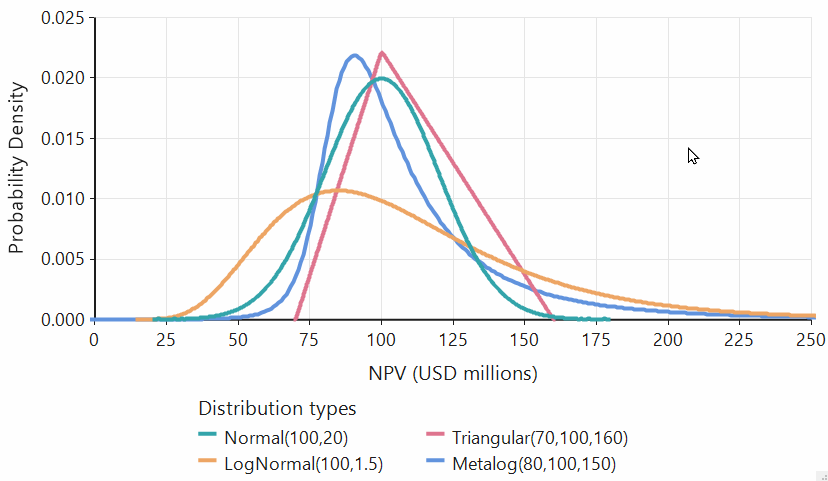
Metalog and distribution fitting. Tom Keelin introduced the metalog family in a 2016 paper, describing flexible continuous distributions that fit unbounded and bounded quantities and include uniform, beta, normal, lognormal, Student-t, gamma, and other common distributions as special cases. Metalogs suit expert elicitations and sample data. Analytica 6.6 introduced Metalog 2.0, which makes fits always feasible and adds closed-form moments and partial expectation, following the 2025 paper “On the properties of the Metalog distribution” by Baucells, Chrisman, Keelin, and Xu.
Dependencies, correlations, and copulas. Most real applications contain uncertain variables that move together, and ignoring that dependence understates the chance of extreme joint outcomes. Tools represent dependence with correlation matrices, multivariate distributions, and copulas.
SIPmath standards. A SIP, or Stochastic Information Packet, is a random sample that represents uncertainty about a quantity. The SIPmath standards specify file formats that store and exchange such samples in a form that is actionable, arithmetical, and auditable. SIPmath 3.0 uses the HDR portable pseudo-random number generator and the Metalog distribution to produce a compact JSON representation.
Optimizer. An optimizer searches for the decisions that maximize an objective while the simulation handles uncertainty. “Paid tier” in the table marks tools where this capability costs extra.
Detailed reviews of the seven tools
Every review below follows the same template and a similar length. Analytica comes first because Lumina publishes this page, and the other six tools follow in the same order as the tables.
Analytica (Lumina Decision Systems)

Lumina Decision Systems develops Analytica, a visual modeling environment in which users draw an influence diagram of chance variables, decisions, objectives, and constraints instead of building models in spreadsheet cells. Intelligent Arrays let one variable carry many dimensions, such as time, region, and scenario, so Monte Carlo runs over multidimensional models need no reshaping. The latest release (Analytica 7.2 at the time of writing) includes Assista, a built-in AI assistant.
Type and platform: Standalone desktop application for Windows, with browser access through ACP.
Best for: Transparent, multidimensional models for policy, energy, environmental, and risk decisions.
Strengths: Analytica documents five strengths that matter to simulation users.
- Latin Hypercube, Sobol, and importance sampling, plus Metalog 2.0 fits that are always feasible
- Influence diagrams, Intelligent Arrays, and dynamic simulation with feedback loops
- Links to Excel, CSV, XML, JSON, databases, Python, and web services, including OAuth2 sign-in to services such as Google Sheets and Salesforce
- Assista, included in the Free edition, and web deployment through ACP
- An Optimizer edition with solver plug-ins such as Gurobi and Knitro
The first two strengths support auditable models, and the last three widen how teams connect, share, and optimize them.
Limitations: Buyers should weigh four limitations.
- A modeling paradigm that differs from spreadsheet logic and takes time to learn
- A smaller user base than the Excel add-ins
- A Windows-only desktop application, with browser access only through ACP
- A Free edition limit of 101 variables and other objects
The paradigm and user-base points matter most for teams that already standardize on Excel.
Pricing (checked November 2026): Analytica Free costs $0 with no time limit. Professional costs $1,000 per year, Developer $2,000, and Optimizer $4,000, while ACP Basic Group costs $2,000 per year and ACP Premium Group $5,000, per the pricing page. Education and non-profit users receive a 50 percent discount.
Verdict: Analytica suits teams that need a transparent model across many dimensions, with uncertainty and optimization in one environment. Teams that plan to stay inside Excel should weigh the learning curve before adopting it.
Website: analytica.com
@RISK (Lumivero, formerly Palisade)

@RISK is a widely used Excel add-in that adds probability distributions, correlation tools, and sensitivity analysis to spreadsheet models. Users run thousands of trials and examine outcome ranges, risk profiles, and tornado charts inside Excel. Lumivero, formerly Palisade, also sells @RISK inside the DecisionTools Suite.
Type and platform: Excel add-in for Windows.
Best for: Finance and project risk teams that standardize on Excel.
Strengths: @RISK has four strengths for spreadsheet users.
- Runs inside Excel, so users keep their formulas and workflow
- Monte Carlo and Latin Hypercube sampling, with Latin Hypercube as the default method
- Tornado and spider chart outputs
- @RISK Agent, a beta connector to Claude that Lumivero has offered at no added cost since May 2026
Together these strengths let spreadsheet users add simulation and an AI assistant without leaving Excel.
Limitations: Buyers should weigh four limitations.
- No Metalog function in the version 8.10 distribution list
- Proprietary functions that reduce portability outside Excel
- Sampling options limited to Latin Hypercube and Monte Carlo
- A higher annual price than Analytica Professional or ModelRisk
The sampling and distribution gaps matter most for teams that need Sobol sequences, importance sampling, or Metalog.
Pricing (checked November 2026): Vose Software reports that Lumivero’s web shop lists €2,900 per year for Professional and €3,500 for Industrial. Third-party directories list a starting price near $2,225 per user per year on multi-year terms, and buyers should confirm the current U.S. price with Lumivero. A free trial is available.
Verdict: @RISK fits teams that value a familiar Excel interface and an established product. Teams that need Metalog, Sobol, or importance sampling should look at other tools.
Website: lumivero.com
Analytic Solver (Frontline Systems)

Frontline Systems develops Analytic Solver, an Excel add-in that combines Monte Carlo simulation with optimization, forecasting, and decision trees. It supports standard Monte Carlo, Latin Hypercube, and Sobol sampling, adds a PsiMetalog function, and has supported the SIPmath 3.0 standard since version 2021.5. Analytic Solver Cloud extends the product to Excel for the web.
Type and platform: Excel add-in for Windows, with a cloud version for Excel for the web.
Best for: Teams that need simulation combined with optimization in Excel.
Strengths: Analytic Solver documents five strengths.
- Simulation, optimization, and decision trees in one add-in
- Latin Hypercube and Sobol sampling, a PsiMetalog function, and SIPmath 3.0 support
- An AI Agent, available since September 2023
- A cloud version that works in Excel for the web
- A converter for @RISK models
These strengths give it more documented capabilities in the table than any other Excel add-in.
Limitations: Buyers should weigh three limitations.
- No documented support for importance sampling
- A Comprehensive edition that costs twice as much as the Simulation edition
- A starting price of $3,000 per year, above Analytica Professional and ModelRisk
Price and sampling coverage are the main factors to weigh.
Pricing (checked November 2026): Frontline’s pricing page lists Analytic Solver Simulation at $3,000 per year or $450 per month, and Comprehensive at $6,000 per year. A 15-day free trial is available.
Verdict: Analytic Solver fits teams that need simulation and optimization under uncertainty in one Excel add-in. Teams that need only simulation can compare the Simulation edition against other add-ins on price.
Website: solver.com
ModelRisk (Vose Software)

ModelRisk is an Excel add-in for professional risk analysts who need modeling depth, and its interface targets more technical users than the other add-ins. Vose Software’s product page cites 136 distributions, 14 copulas, and 34 time series models, and ModelRisk exports results to SIPmath 3.0. David Vose has argued that Latin Hypercube sampling adds little over standard Monte Carlo, and ModelRisk’s public documentation does not confirm an LHS option.
Type and platform: Excel add-in for Windows 10 and 11, with Excel 2016 or later.
Best for: Technical analysts who need copulas, time series, and distribution depth.
Strengths: ModelRisk documents four strengths.
- A large library of distributions, copulas, and time series models
- Export to SIPmath 3.0
- One edition with every feature, and a free edition after the 15-day trial
- An open-source MCP server for AI assistants
The first two strengths suit technical dependence modeling, and the last two simplify buying and AI integration.
Limitations: Buyers should weigh three limitations.
- A requirement for Windows and Excel
- No documented Latin Hypercube, Sobol, importance sampling, or Metalog support
- No documented optimizer
Teams that rely on a specific sampling method or optimizer should confirm availability with Vose before buying.
Pricing (checked November 2026): Vose Software states a maximum of €1,550 per user per year, with all features in one edition. A 15-day trial of the full product precedes the free Basic edition.
Verdict: ModelRisk suits analysts who prioritize distributions, copulas, and time series, and who accept Windows and Excel as requirements. Teams that need Sobol, importance sampling, or Metalog should look elsewhere.
Website: vosesoftware.com
ChanceCalc+ (ProbabilityManagement.org)

ChanceCalc+ builds Monte Carlo simulations inside Excel, and the finished models run in native Excel without the add-in installed. Models perform hundreds or thousands of trials per keystroke through Excel’s built-in Data Table function. ChanceCalc+ stores results as CSV files or in the open SIPmath 2.0 and 3.0 formats, and it includes tabs for generating 18 distributions and for importing Keelin’s Metalog templates. ProbabilityManagement.org provides the open-source files.
Type and platform: Excel add-in for Windows and Mac.
Best for: Sharing simulations with non-technical audiences or auditors, and working with SIPmath.
Strengths: ChanceCalc+ documents four strengths.
- Models that run and share in native Excel without the add-in
- Metalog support through templates, plus SIPmath 2.0 and 3.0 formats
- Support for both Windows and Mac
- A free education version, ChanceCalc+edu, for both platforms
These strengths suit teams that must share models widely, including with colleagues who do not own the add-in.
Limitations: Buyers should weigh three limitations.
- The product page still describes ChanceCalc+ as in beta test
- No documented tornado charts, dependence modeling, or optimizer
- No documented Latin Hypercube, Sobol, or importance sampling
The beta status is the most important point for production use.
Pricing (checked November 2026): ProbabilityManagement.org lists no price for the full version and offers a ready-to-run install package for purchase. ChanceCalc+edu is free for Mac and Windows.
Verdict: ChanceCalc+ fits teams that must share simulations as ordinary Excel files and teams that work with SIPmath. Teams that need rich built-in analysis should compare the commercial add-ins.
Website: probabilitymanagement.org/chancecalc
GoldSim (GoldSim Technology Group)

GoldSim is a dynamic simulation platform that combines continuous systems, discrete events, and Monte Carlo sampling. GoldSim describes model building as drawing a picture of the system, an influence diagram. It documents Latin Hypercube sampling, custom importance sampling, and correlated stochastic elements.
Type and platform: Standalone desktop application for Windows.
Best for: Engineering and environmental systems that change over time.
Strengths: GoldSim documents four strengths.
- Hybrid simulation of continuous systems and discrete events
- A visual interface in which users draw an influence diagram of the system
- Latin Hypercube sampling, custom importance sampling, and correlation support
- Free Academic and Player editions, plus a Research license at $1,050 for academic use
These strengths favor dynamic models that colleagues need to run without a full license.
Limitations: Buyers should weigh four limitations.
- A higher annual lease than Analytica Professional or ModelRisk
- Complexity that exceeds what simple risk analyses need
- No documented Metalog, Sobol, or SIPmath support
- Windows-only desktop use
The cost and scope make GoldSim a deliberate choice for specialist work.
Pricing (checked November 2026): GoldSim publishes prices in US dollars: a one-year standalone lease costs $2,750, a three-month lease $1,375, and the Desktop license $5,600. GoldSim Research costs $1,050 for academic use only, and the Academic and Player editions are free. A trial is available on request.
Verdict: GoldSim suits engineering and science teams that model systems evolving over time, such as infrastructure, environmental, and reliability systems. Teams with simple risk questions will find a lighter tool easier to adopt.
Website: goldsim.com
Oracle Crystal Ball

Oracle Crystal Ball is an Excel-based Monte Carlo and optimization tool, and Oracle documents it with Latin Hypercube sampling, correlation between assumptions, and the OptQuest optimization module. An earlier edition of this comparison reported that Oracle no longer sold Crystal Ball to new customers. Oracle’s current product page offers a free trial and a pricing link and carries no end-of-sale notice, so buyers should confirm availability with Oracle.
Type and platform: Excel add-in for Windows.
Best for: Existing Crystal Ball users, and new buyers who confirm availability with Oracle.
Strengths: Crystal Ball has three documented strengths.
- Latin Hypercube sampling and correlation between assumptions
- The OptQuest optimization module
- Integration with Excel and sensitivity charts
Oracle’s documentation supports each of these points.
Limitations: Buyers should weigh three limitations.
- Unconfirmed availability to new buyers
- No documented Metalog or SIPmath support
- No documented Sobol or importance sampling
Availability is the first question to settle.
Pricing (checked November 2026): Not confirmed. Oracle’s product page links to its online shop for current pricing.
Verdict: Crystal Ball suits teams that already own it. New buyers should contact Oracle before committing.
Website: oracle.com/applications/crystalball
Free and low-cost options
Free Monte Carlo simulation software exists in three forms: reduced editions of commercial tools, spreadsheet approaches, and code. Reduced editions keep the vendor’s interface but limit model size, features, or permitted use, while code libraries give full flexibility and demand programming skill. The list below names the options and what each one covers.
- Analytica Free: no time limit, up to 101 variables and other objects, Assista included, Windows only (Free edition)
- ChanceCalc+edu: a free education version for Mac and Windows
- ModelRisk Basic: a free edition that follows the 15-day trial
- GoldSim Academic and Player: free editions for academic use and for running existing models
- Excel with RAND and Data Tables: no add-in required for simple models
- XLRisk: a free, open-source Excel add-in under the MIT license for Windows and Mac
- Python and R: NumPy, SciPy, and R packages for analysts who write code
- NIST Uncertainty Machine: a web-based application for measurement uncertainty that applies the Monte Carlo method
Each option has limits, such as the 101-object cap in Analytica Free, the education focus of ChanceCalc+edu, and the programming skill that Python and R require, so test one on a real model before committing. The Excel approach costs nothing but lacks ready-made distribution libraries, correlation tools, and sensitivity charts, which is the gap that add-ins fill. Retirement-planning simulators, such as Portfolio Visualizer, serve a different need, because they model investment returns and not general decision models.
Trends to watch in 2027
Five developments are changing how analysts build and share simulations. The list below describes each one.
- AI assistants inside modeling tools. Assista, @RISK Agent, the Analytic Solver AI Agent, and the ModelRisk MCP server show vendors adding AI assistance, and general assistants such as ChatGPT can write simulation scripts through code execution. A person must still check the distributions and dependencies that any AI-written script assumes.
- Wider Metalog support. Analytica, Analytic Solver, and ChanceCalc+ document metalog distributions, and Analytica’s Metalog 2.0 makes fits always feasible. These distributions suit fitting expert judgment and data.
- Portable simulation results. SIPmath 3.0 export appears in Analytica, Analytic Solver, ChanceCalc+, and ModelRisk, which lets teams move simulation results between tools and audit them later.
- Browser and cloud deployment. ACP and Analytic Solver Cloud let non-technical stakeholders run and review models in a browser without installing desktop software.
- Python inside spreadsheets. Microsoft’s Python in Excel brings code-based simulation into the spreadsheet, which narrows the gap between Excel and code.
Each trend lowers the cost of building a simulation and raises the value of reviewing how a team structured the model.
Is this comparison objective?
Monte Carlo experts at Lumina Decision Systems, the makers of Analytica, wrote this comparison. We recognize that Analytica is not the right choice for everyone, so we applied the same criteria to every tool, listed real limitations for each one, and checked each claim against public vendor sources. We re-check features and prices at least once a year. If you notice anything inaccurate or biased, please contact Lumina Decision Systems so that we can correct it.
These steps reduce the risk of bias but do not eliminate affiliation, so readers evaluating a purchase should weigh this article alongside independent sources.
Frequently asked questions
What is the best Monte Carlo simulation software?
No single product is best for every team, because the answer depends on where you build models. Excel users with finance or project risk models should compare @RISK, Analytic Solver, and ModelRisk. Teams that need multidimensional, transparent, or dynamic models should compare Analytica and GoldSim.
What is the best free Monte Carlo simulation software?
Analytica Free has no time limit, allows up to 101 variables and other objects, includes the Assista AI assistant, and runs on Windows. ChanceCalc+edu, GoldSim Academic and Player, and ModelRisk’s free edition cover narrower needs, and XLRisk, Python, and R cost nothing for users who code. Retirement planners such as Portfolio Visualizer address a different need.
Can you run a Monte Carlo simulation in Excel without an add-in?
Yes, for simple models. A random-number function such as RAND recalculates with every worksheet change, and a Data Table can repeat that recalculation thousands of times to build a sample of results. Add-ins exist because the manual approach lacks ready-made distributions, correlation tools, and sensitivity charts.
Which Monte Carlo software works on a Mac?
ChanceCalc+ works with Excel for Mac, and its free education version runs on Mac and Windows. Analytic Solver Cloud runs in Excel for the web, Analytica models run in a browser through ACP, and the free XLRisk add-in works with Excel for Mac. The other add-ins and GoldSim are Windows-only.
Can ChatGPT or other AI tools run a Monte Carlo simulation?
Yes, if the assistant can execute code. ChatGPT and similar tools can write and run a Monte Carlo script in Python, but the result is only as sound as the distributions and dependencies the script assumes, and a person must check both. Dedicated modeling tools add audit trails and sensitivity outputs.
What is better than Monte Carlo simulation?
The answer depends on the question. Monte Carlo simulation suits models with many uncertain inputs and continuous ranges, while a decision tree gives exact expected values for a few discrete branches. The decision analysis software comparison covers tools that support decision trees, influence diagrams, and simulation.
Is Monte Carlo simulation software good for financial risk and investment analysis?
Yes, any package here can support financial risk analysis. Correlated investments and time-based dependence call for proper treatment of probabilistic dependencies, so compare Analytic Solver, @RISK, and ModelRisk among the add-ins. Analysis across time, projects, portfolios, and scenarios may suit Analytica best. The risk analysis software comparison covers risk methods in more depth.
How do Monte Carlo tools compare on Excel and business-app integration?
Analytic Solver, @RISK, ModelRisk, Crystal Ball, and ChanceCalc+ integrate directly with Excel, and ChanceCalc+ models run in native Excel after you build them. Analytica runs standalone and reads and writes Excel files, CSV, XML, JSON, relational databases, Python, and web services. Analytica also supports OAuth2 sign-in to web services such as Google Sheets and Salesforce.
What should you consider for portfolio management?
A small portfolio of projects or investments suits any of the Excel add-ins. A portfolio with dependencies among projects needs a tool that supports probabilistic dependence. A larger portfolio, or projects with varying model structures, suits Analytica, and choosing projects under a budget adds an optimization step that the optimization and solver software comparison covers.
What should you consider for scientific and engineering applications?
Complex dynamic systems, whether physical or economic, suit GoldSim and Analytica, which both combine Monte Carlo simulation with dynamic modeling. GoldSim simulates continuous systems and discrete events together, and Analytica adds Intelligent Arrays for multidimensional data. Teams that focus mainly on feedback loops and time delays should also read the system dynamics software comparison.
Which software best supports transparency in Monte Carlo modeling?
Spreadsheets are transparent because most people understand them, but repeated formulas and cell references can obscure model logic. Analytica and GoldSim both display influence diagrams that show variables and their relationships. Analytica’s Intelligent Array formulas also keep operations on multidimensional arrays clear, and ChanceCalc+ keeps finished models in native Excel.
Which tools handle project schedule risk analysis?
Dedicated schedule risk tools such as @RISK’s ScheduleRiskAnalysis module and Safran Risk simulate task networks directly. The general-purpose tools in this article can also simulate a schedule model that you build, using distributions for task durations and costs. The risk analysis software comparison covers schedule and cost risk in more depth.
Edited by Srdjan Gombar